MCP Server Guide
The Vysion MCP server lets you use Vysion’s threat intelligence directly from AI assistants such as Claude Code, Claude Desktop (claude.ai), Mistral (Le Chat), Cursor, OpenCode, and more.
Instead of writing code or calling the REST API, you connect the server once and then ask questions in plain language. The assistant decides which Vysion tool to call and returns the results to you.
What is MCP?
Section titled “What is MCP?”MCP (Model Context Protocol) is an open standard that lets AI assistants use external tools and data sources. When you connect the Vysion MCP server, your assistant gains access to Vysion’s darknet intelligence (documents, leaks, instant messaging, ransomware victims, feeds, and more) as a set of tools it can invoke on your behalf.
Prerequisites
Section titled “Prerequisites”- A Vysion API key (see Authentication)
- A compatible client: Claude Code, Claude Desktop / claude.ai, Mistral / Le Chat, Cursor, OpenCode, or any other MCP-compatible client
Connection Details
Section titled “Connection Details”Use the same values in every client:
| Setting | Value |
|---|---|
| Server URL | https://mcp.vysion.ai/mcp |
| Authentication | Your personal Vysion API key |
Claude Code
Section titled “Claude Code”Claude Code supports two ways to add the Vysion MCP server: a CLI command or a configuration file.
Run the following command in your terminal:
claude mcp add vysion \ --transport http \ https://mcp.vysion.ai/mcp \ --header "Authorization: Bearer YOUR_API_KEY"Replace YOUR_API_KEY with your personal Vysion API key.
Create a .mcp.json file in your project root (or add the entry to your existing one):
{ "mcpServers": { "vysion": { "type": "http", "url": "https://mcp.vysion.ai/mcp", "headers": { "Authorization": "Bearer ${VYSION_API_KEY}" } } }}After adding the server, verify it is connected by running the /mcp command inside Claude Code. You should see Vysion listed with its tools.
Claude Desktop / claude.ai
Section titled “Claude Desktop / claude.ai”Claude Desktop, Cowork and the claude.ai web app share the same Connectors settings, so you only need to add Vysion once per account.
1. Add the custom connector
Section titled “1. Add the custom connector”On Team and Enterprise plans only an organization Owner (or admin) can add custom connectors. Members with a managed account will not see the option and must ask an Owner to complete this step. On individual plans (Pro, Max) you can do it yourself.
- Open Settings → Connectors and click Add → Add custom connector.
- Fill in the form with these values:
| Field | Value |
|---|---|
| Name | Vysion |
| Remote MCP server URL | https://mcp.vysion.ai/mcp |
| Authentication | No sign-in |
| Request header name | x-api-key |
| Request header value | YOUR_API_KEY |
| Required | Checked |
- Click Add.
2. Connect it (every member)
Section titled “2. Connect it (every member)”Once the connector exists, each user has to connect it with their own Vysion API key:
- Go to Settings → Connectors and find Vysion under Yours (it is shown as a Custom connector).
- Click Connect and enter your personal Vysion API key when prompted.
3. Use it in a chat
Section titled “3. Use it in a chat”In a new conversation, open the + menu → Connectors and make sure Vysion is enabled. Then ask your question in natural language.
By default Claude asks for permission each time it calls a Vysion tool. To skip the prompt, set the Vysion tools to Always allow in the connector’s settings.
Mistral / Le Chat
Section titled “Mistral / Le Chat”- Open Mistral and go to Connectors.
- Click Add connector and select Add a custom connector.
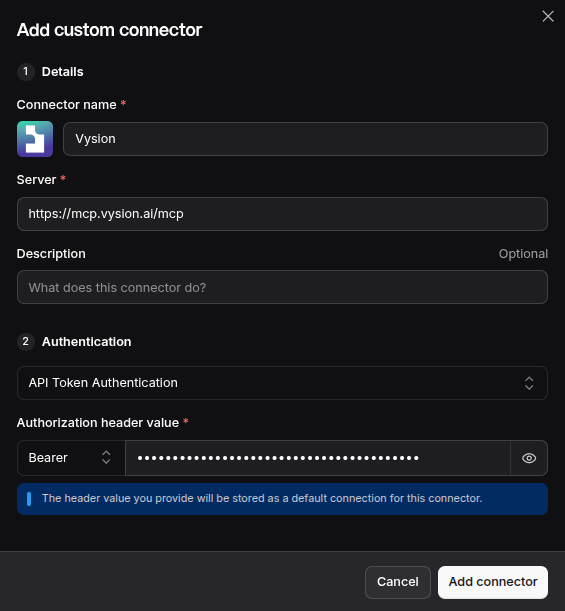
- Fill in the form with these values:
| Field | Value |
|---|---|
| Name | Vysion |
| Connector Server | https://mcp.vysion.ai/mcp |
| Authentication | API Token Authentication |
| Header name | Authorization |
| Type | Bearer |
| Token | YOUR_API_KEY |
- Save the connector and enable it for your conversations.
What You Can Do
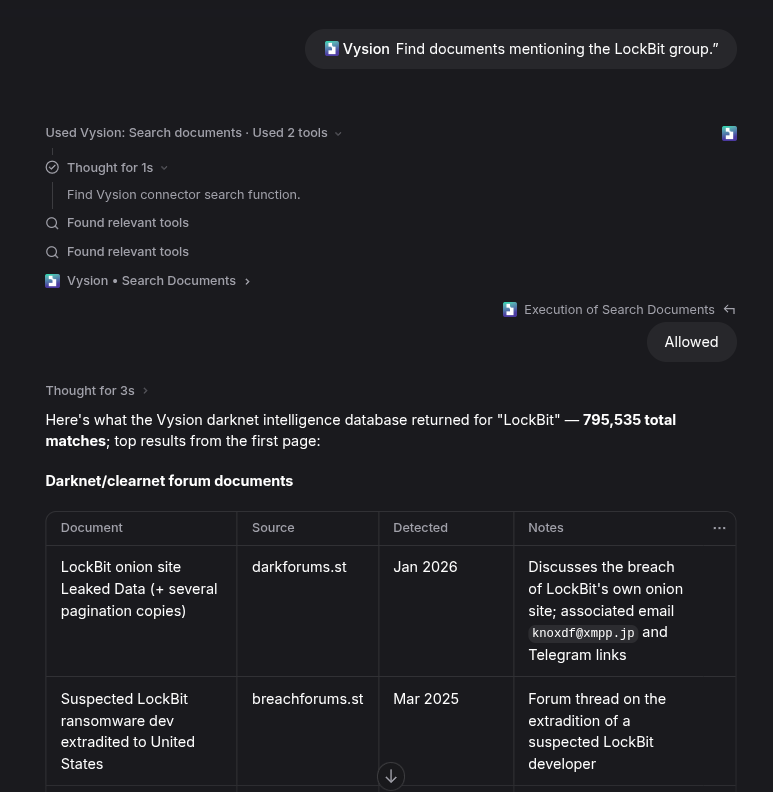
Section titled “What You Can Do”Once connected, ask questions in natural language. The assistant will pick the right Vysion tool automatically. For example:
- “Search for leaked credentials for the email
admin@example.com.” - “Show me ransomware victims in the healthcare sector from the last 30 days.”
- “Find documents mentioning the LockBit group.”
- “Check if this Bitcoin address appears in any leak or dark web source.”
Available Tools
Section titled “Available Tools”The Vysion MCP server exposes tools across these categories:
- Documents: search and retrieve threat intelligence documents
- Leaks: search leaked data by email, wallet, IP, phone, username, or hash
- Instant Messaging: search Telegram and Discord messages, channels, and profiles
- Ransomware Victims: search ransomware victims and groups
- Ransomware Stats & Histograms: statistics by country, group, and sector
- Feeds: ransomware, Telegram, cryptocurrency, and onion feeds
- OSINT: phone number intelligence
For endpoint details and parameters, start with the Documents API reference and use the API Reference sidebar for the remaining categories.
Troubleshooting
Section titled “Troubleshooting”401 Unauthorized
Section titled “401 Unauthorized”The server returns 401 when the API key is missing or invalid. Check that:
- You replaced
YOUR_API_KEYwith your real key. - The header is
Authorization: Bearer YOUR_API_KEY(Claude Code, Mistral) orx-api-key: YOUR_API_KEY(Claude Desktop / claude.ai).
Claude Desktop: “Authorization is reserved” or “header name isn’t approved”
Section titled “Claude Desktop: “Authorization is reserved” or “header name isn’t approved””Claude does not allow Authorization or arbitrary custom header names (such as bearer) on custom connectors. Use x-api-key as the header name.
Claude Desktop: “Couldn’t register with Vysion’s sign-in service”
Section titled “Claude Desktop: “Couldn’t register with Vysion’s sign-in service””The connector was created with an OAuth authentication option. Edit it and set Authentication to No sign-in.
Claude Desktop: no option to add a custom connector
Section titled “Claude Desktop: no option to add a custom connector”On Team and Enterprise plans only the organization Owner can add custom connectors. Ask them to add Vysion (see step 1); you can then connect it yourself.
Connector not appearing in Mistral
Section titled “Connector not appearing in Mistral”Make sure you selected API Token Authentication and set the header to Authorization with type Bearer. Mistral detects the connector type from the server’s authentication response.
Rate limits
Section titled “Rate limits”The Vysion API is rate limited. See the Rate Limiting guide for details.